Garrison

gar·ri·son

/ˈɡarɪsən/  ·  noun  ·  [O.Fr. garison, “defence, provision”; cf. L. praesidium]

A fortified post where a body of troops is stationed to hold and defend it.

In Garrison: the local base where your sessions (AI agents you configure) are stationed: faculties (capability slots) filled by swappable fittings, an Orchestrator directing, all quartered over your own Claude Code / Codex / Agent SDK setup (or any other CLI/SDK) in the Quarters. Composed the way veterans run it.

01 · The base

The structured base for your whole AI ecosystem.

Working with AI agents means keeping up with too much: which tools are best right now, which MCPs, which models, which skills, what each can actually do. You need expertise in five areas to get good work out of one agent.

Then comes the juggling: platforms, tools, providers, and models, each with its own setup, accounts, and way of doing things.

No single platform solves this, and none is coming soon. The big providers (Anthropic, OpenAI) build generalist tools that don't bend to your workflow; the small ones do one thing well and nothing else.

Garrison is the base where it all comes together. Pick the tools, providers, and harnesses you want; Garrison makes them work as one system. Start from curated compositions that veterans run daily, then change anything: adjust by configuration, or clone a part and redo it. Opinionated, never rigid.

A composition is a chosen set of fittings filling the faculties: reasonable defaults, fully swappable, customizable with no development knowledge.

02 · The ranks

Who Garrison is for.

developers

Switch models, runtimes, effort, and skills per task; build whole new profiles and flows. Experiment fast, keep the workflow you have.

builders

Assemble reliable agents from vetted parts: pick a fitting from a plain description and let the assistant wire it up.

end-users

Run a personal session on your own machine: memory, scheduling, tasks, and actions. An assistant that is yours, not a black box.

03 · The charter

Standing Orders

Ten articles the garrison follows without question.

I

task ORCHESTRATOR single entry point Claude Code · Opus Codex · GPT Gemini CLI · Gemini opencode · GLM Agent SDK · DeepSeek skill fast standard expert

Sessions are model-agnostic.

The Orchestrator, the session's single entry point, routes each task to the right runtime, model, effort, and skills. Any runtime can hold the primary post; the rest take delegations.

II

apm.yml fitting scanned stationed Vault-sealed · AES-256-GCM never logged

Sessions are secure.

Every fitting is a scanned, vetted APM package; secrets are Vault-sealed with AES-256-GCM and never logged.APM is Microsoft's package manager for agent parts: npm, but for skills, access, and memory.

III

faculty slot fitting A default fitting B

Opinionated, but completely flexible.

Garrison ships the defaults of the daily AI ecosystem; swapping a fitting is one click.

IV

09:14:02 read apm.yml 09:14:03 verify 20/20 pass 09:14:09 route codex · fast 09:14:31 write report.md 09:15:00 notify slack memory · basic-memory what it does, in plain words, and how to configure it.

Everything is transparent and observable.

Every action is logged and visible; every faculty, fitting, and setting carries a plain description.

V

python any shape node any runtime faculty contract one socket, any part that honours it

Every fitting fulfils a faculty contract.

One contract lets parts in any language or runtime fill the same slot; the session never asks how a part was built.

VI

Garrison · arranges ~/.claude · ~/.codex · whole and visible layer swallows the base

Compose, don't own.

Garrison arranges your real ~/.claude, ~/.codex, ~/.gemini; it never replaces your tools or traps you in a runtime of its own.

VII

data · keys · memory

Local-first. Your machine, your data, your keys.

Sessions run on your hardware; secrets, memory, and logs stay with you.

VIII

sessionsessionsession skills +1 routing +1 memory +1

The system improves itself.

The Improver reads every session, sharpening your skills, routing, and memory with use.

IX

STATE coordination · leases vault keys · git-synced one vault one copy · shared by all nodes second machine cloud box container gpu box session watch live sessions run per node · state stays one

One mesh, many nodes.

Enrol several machines as one mesh: your other computers, cloud boxes, containers. They share a single state service and one git-synced vault, so a session started on any node runs there and is watchable from every other.

X

open export function up() { install(); verify(); assemble(); spawn(); } auditable end to end no lock-in

Open by default.

MIT-licensed, auditable end to end, no lock-in.

04 · The pains

Four pains, one seed composition.

Each pain below is solved by the current seed composition; every part of it can be swapped. Panels are illustrative; the bullets are what runs today.

Sched.BacklogTo do RunningNeeds in.Done ship login fix · Implement logshotvideo { } editor

Pain 1 · Coordination

Parallel sessions that know nothing about each other.

You open a second session and it immediately steps on the first. You end up serializing work, or babysitting branches.

The seed composition:

  • Every task is a visible card on the Kanban Loop: dev tasks, personal tasks, manual work, one board.
  • A coordination fitting lets agents see what the others are doing and build on each other's work.
  • Everything runs on the main branch. No worktrees needed: cards and coordination make trampling impossible.
  • A heartbeat picks up finished cards and tests them together in one batch.
  • Plans gate builds; evidence lands on the card at every stage: logs, screenshots, videos you can judge from your phone.

Prefer worktrees? That exists as an alternative composition. Use what veterans run, adjust it, or build your own, vetted through APM.

sessions claude codex gemini + new claude · main $ claude shell · tmux $ npm test tmux · survives reboots localhost:3000 sees what you see CDP

Pain 2 · Capacity

Juggling accounts, providers, limits, and machines.

Usage caps hit mid-task. You hold accounts on several providers and switch by hand. Your other machines sit idle.

The seed composition:

  • Runtime fittings for Claude Code on a warm PTY pool, Agent SDK, Codex, Gemini CLI, opencode, the OpenRouter and Hugging Face model routers, remote-shell to an agent on another machine, and any runtime you add; any of them can be the primary.
  • The Orchestrator classifies each task and picks runtime, model, and effort by rule, automatically or by your override.
  • Register several accounts; the Paymaster hands each session the least-used one, holds when all are capped, and flags dead tokens for re-login.
  • Swap the whole policy by switching composition: cheap, quality, or balanced daily.
  • The mesh links your other machines as nodes: a session runs pinned to its node and watchable from any other, with memory and the scheduler shared across all of them.
  • Memory travels with you: the Obsidian vault git-syncs across machines, shared by every runtime and agent.

All defaults. Use the routing and account policy veterans run, adjust it, or build your own, vetted through APM.

DRILL BOOK pages/login.yml open /login sign in · stored auth create a card board updates edit delete card · off auth: provided once run 14 · step 4 of 6 vision pass finding vision run e2e suite assertions graduate with green runs

Pain 3 · Testing

Being the test browser yourself.

Every change means opening the browser, logging in again, clicking through the same flow to see what broke.

The seed composition:

  • Drill plans tests as visible, editable steps: a Drill Book per page of your app, diffable in the repo.
  • Give feedback on any step and see exactly what happened in it, run by run.
  • Provide authentication once; runs log in by themselves and stop stumbling on logins.
  • Browser automation with vision runs the steps; assertions graduate into a repeatable e2e suite that catches regressions without you watching.

The seed default. Use the QA flow veterans run, adjust it, or build your own, vetted through APM.

WEB CHANNEL Discuss Code Plan fix the flaky test plan · 3 steps detail + read aloud plan my day silence detection

Pain 4 · Presence

Work stopping when you leave the desk.

You step away and everything waits for you.

The seed composition:

  • The Web Channel: responsive, mobile-first chat over one session. Zeca is its resting identity; the Orchestrator routes real work to the right duty.
  • Use the Discuss duty until a brief is right, queue it, or run something simple immediately.
  • Type, talk, or listen: local or Deepgram voice with silence detection; replies and documents read aloud.
  • Schedule and automate. Every card stays on the Kanban Loop, evidence comes back to the channel, and you review results without retesting.

Also swappable: a Slack channel instead, or whatever veterans run next; adjust it or build your own, vetted through APM.

05 · The veterans

Use what the veterans use.

Every composition and fitting is a package other builders can battle-test and pass on. Adopt what veterans run daily, adjust one that almost fits, or build your own; every package goes through APM security scanning. The seed composition is the first veteran composition. Yours can be next.

06 · The state of the art

Running today.

Every image below is a real screenshot of one live base, taken the day this page shipped: an session running, verify clean. Not mockups, not a roadmap. Stay for the tour and you will know how the whole system works.

The base

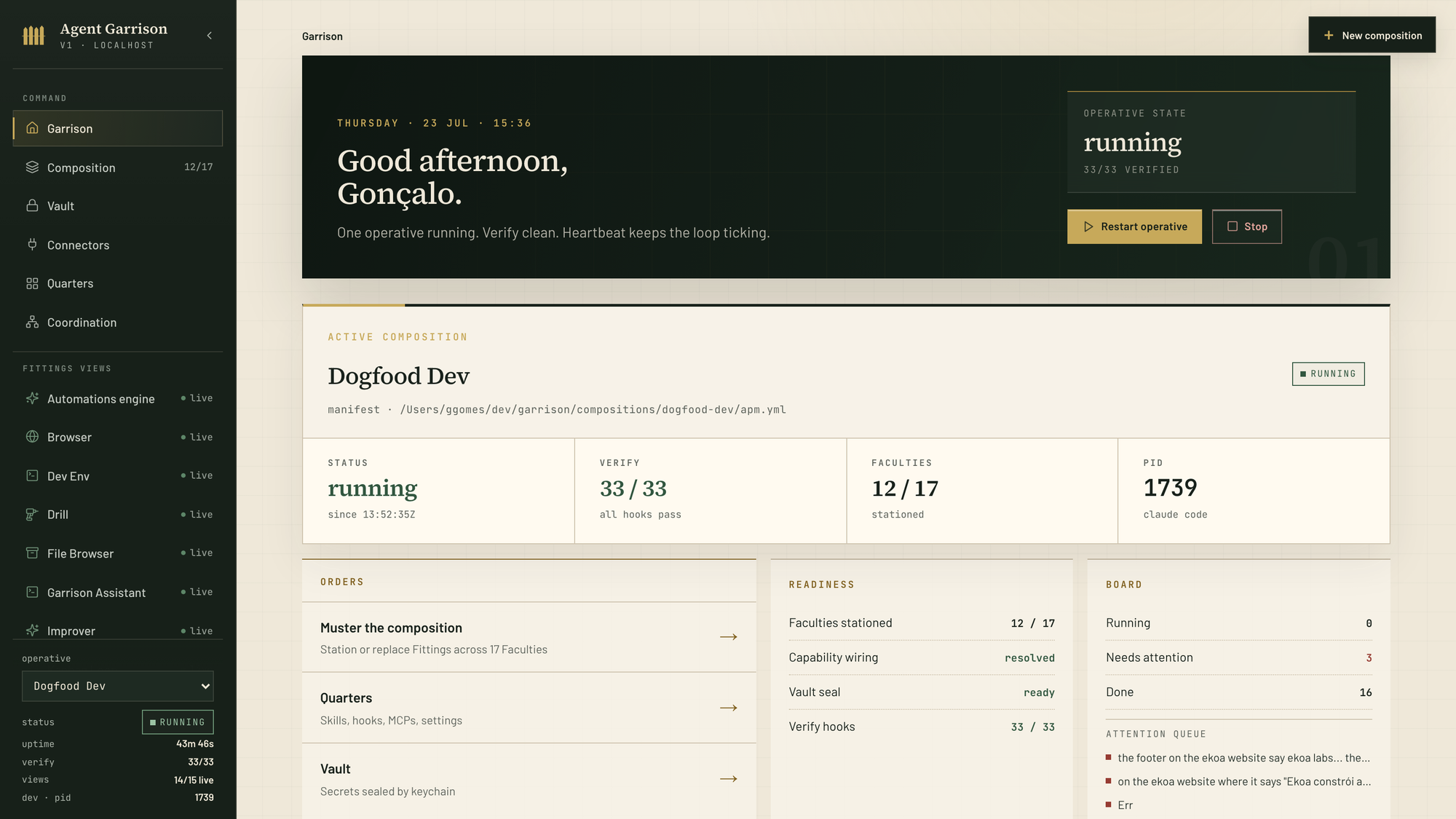
The Garrison dashboard with a running session

The dashboard

One session running over the Dogfood Dev composition: 33/33 verify hooks green, 12 of 17 faculties stationed, board summary and attention queue in one glance. Restart or stop the session from here; every fitting view in the sidebar is one click deep.

Compose

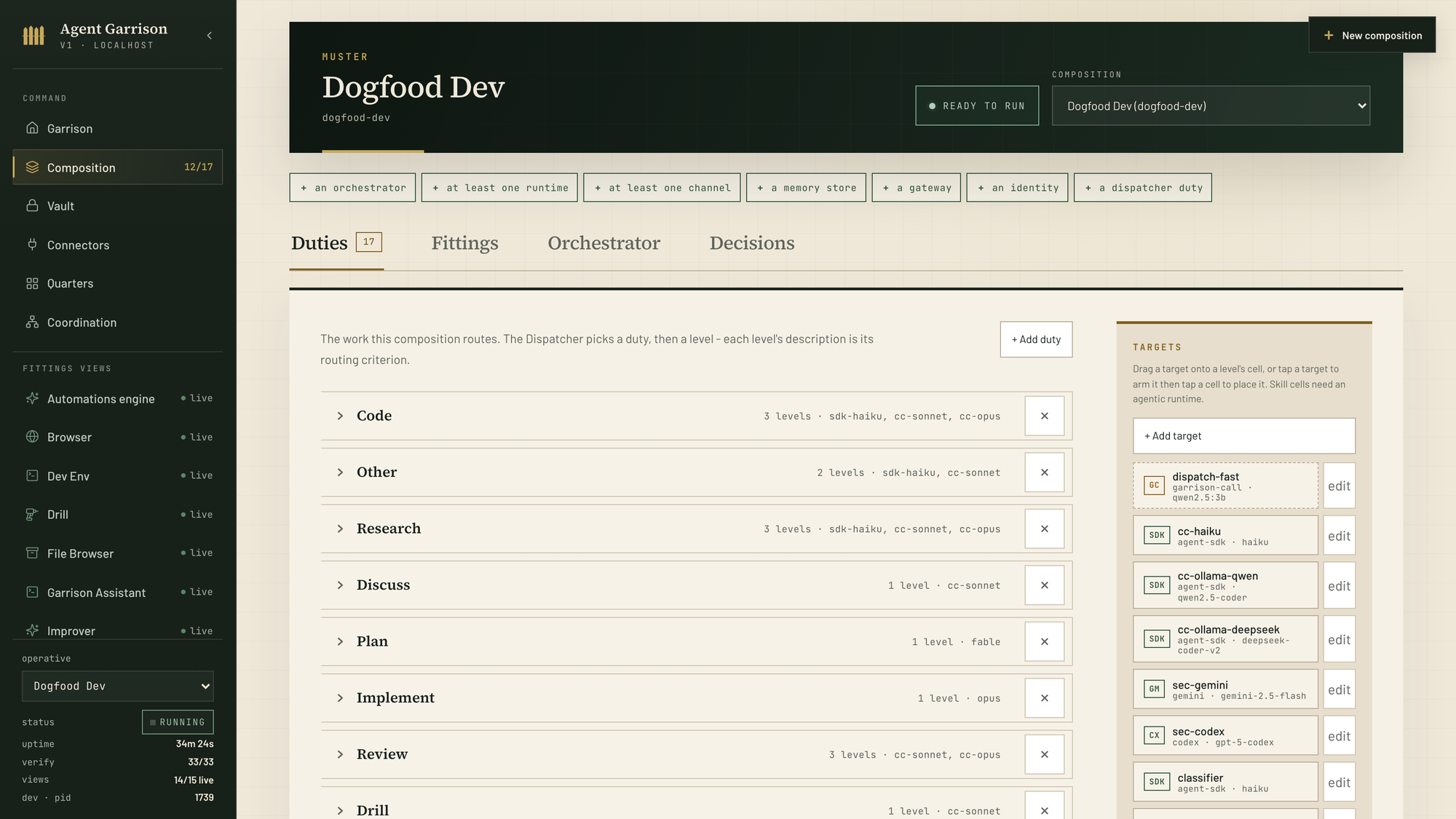
The Composition page on the Duties tab

Composition · Duties

The 17 duties this composition routes: Code, Research, Discuss, Plan, Implement, Review, Drill, and more. Each duty has levels, and each level's description is its routing criterion. On the right, configured runtime targets such as Claude Code, Agent SDK, Codex, and Gemini are draggable onto any level.

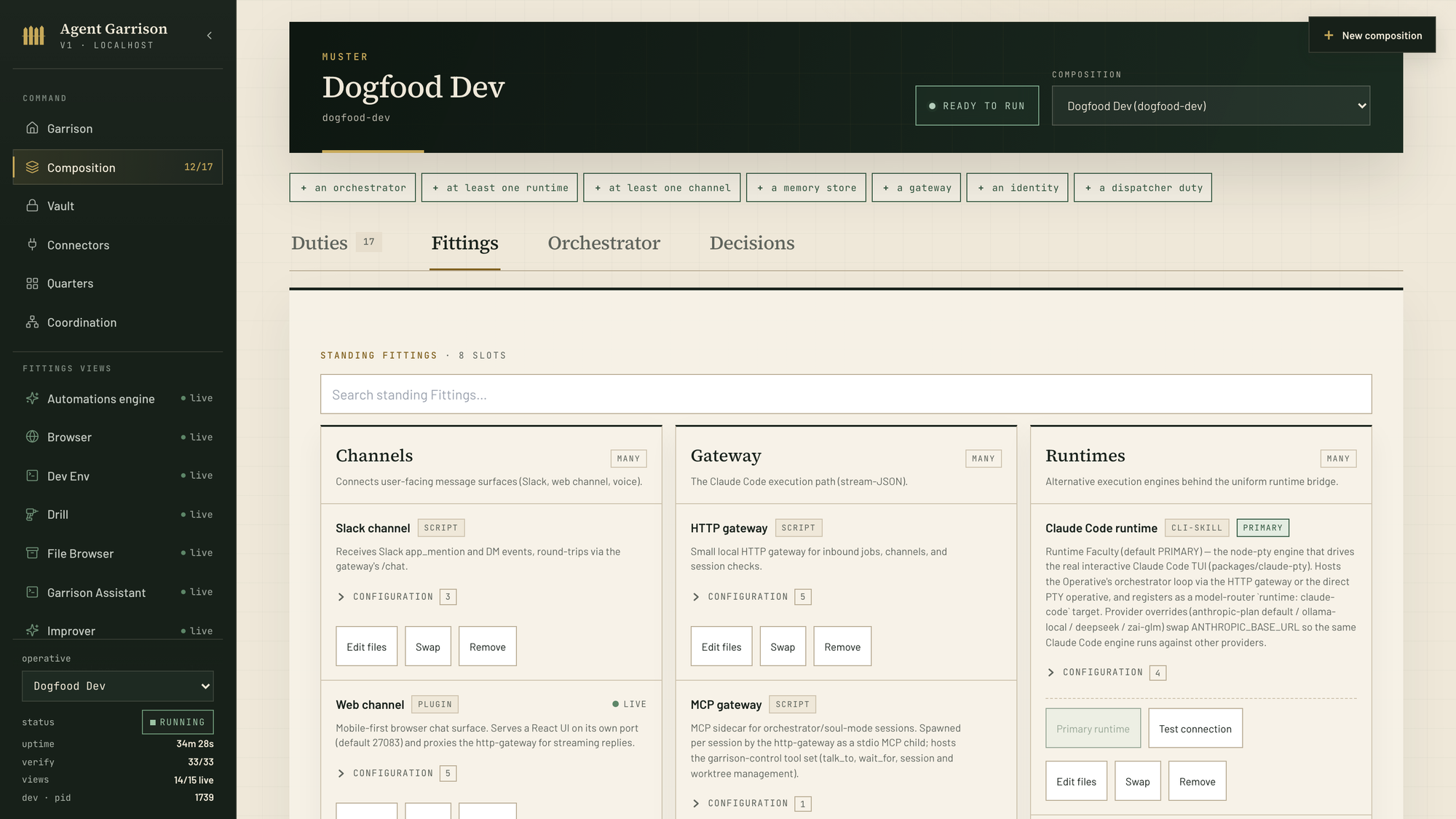
The Composition page on the Fittings tab

Composition · Fittings

The standing Fittings by faculty: channels, gateways, and the Runtimes column with Claude Code marked PRIMARY. Any runtime can hold that post; every card carries its configuration, Swap, and Edit files.

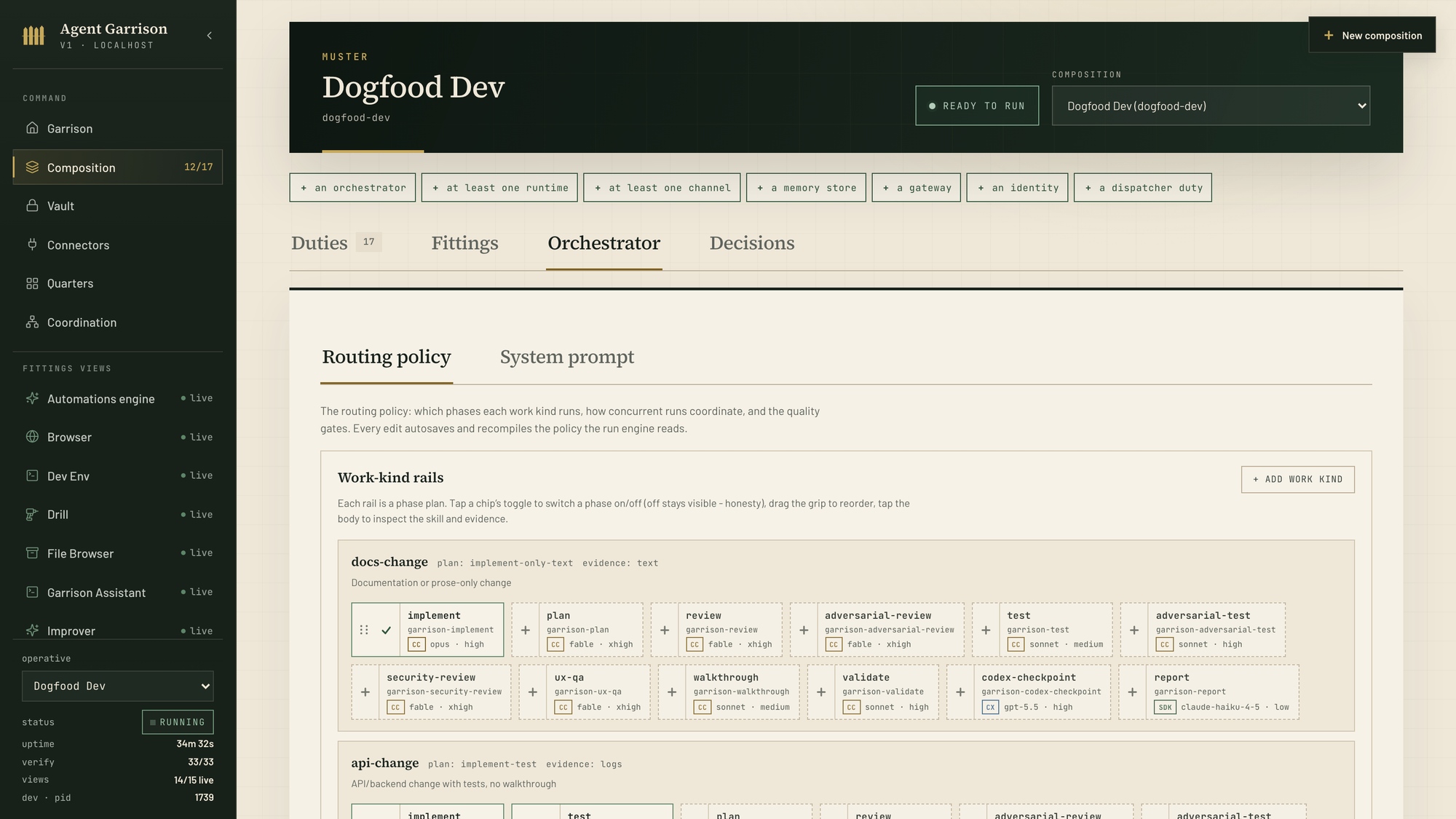
The Orchestrator routing policy

Composition · Orchestrator

The routing policy the run engine reads: per-flow rails whose phase chips name the skill, runtime, model, and effort of every gate; cc·opus, cc·fable, cx·gpt-5.5, sdk·haiku. Edits autosave and recompile the policy.

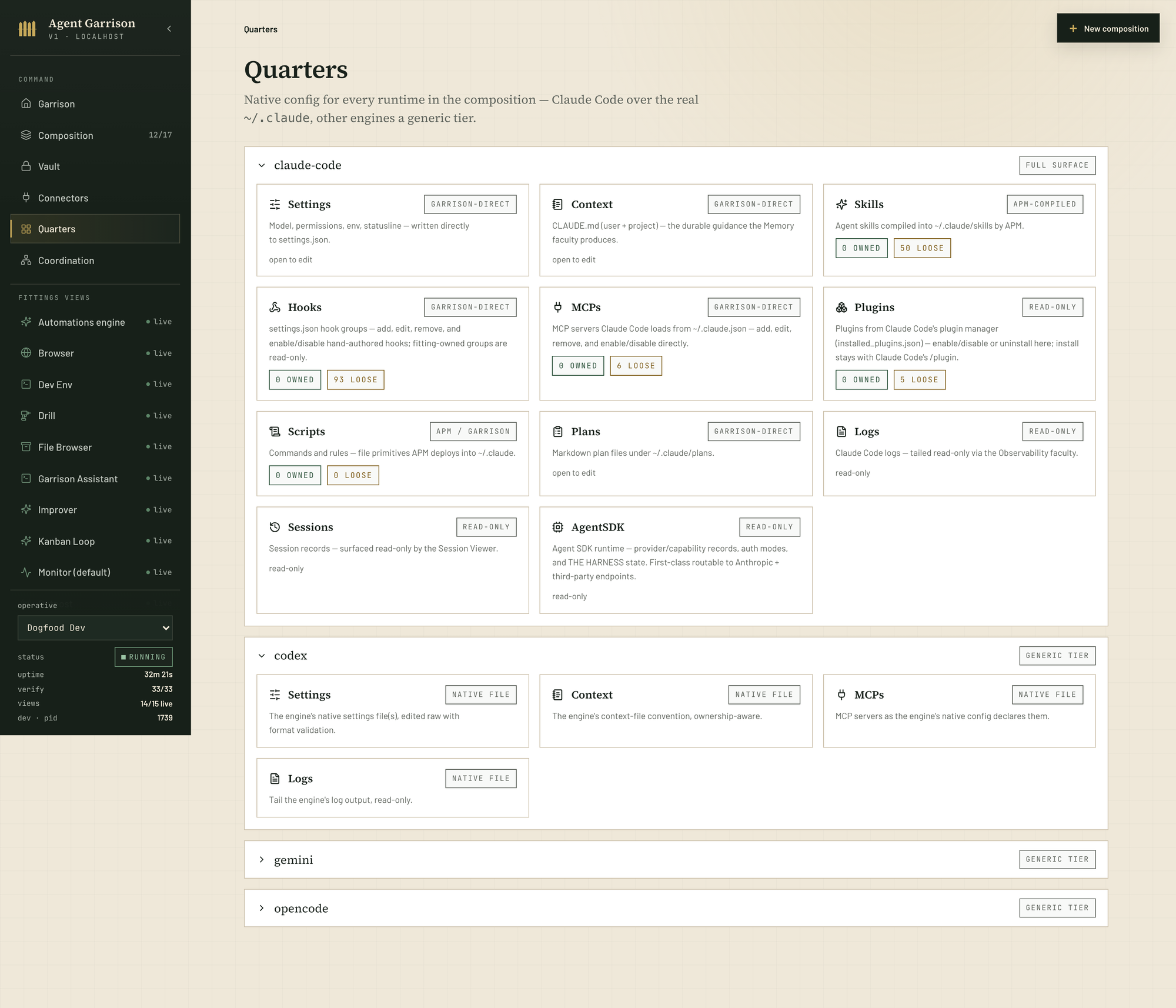
Quarters

Quarters with claude-code and codex expanded, gemini and opencode below

Quarters

Native config for every runtime in the composition. Claude Code gets the full surface over the real ~/.claude: settings, context, skills, hooks, MCPs, plugins, scripts, plans, logs, sessions, Agent SDK. Codex, Gemini, and opencode get the same treatment over their own native files. Owned vs loose is always visible, and APM is the only package writer.

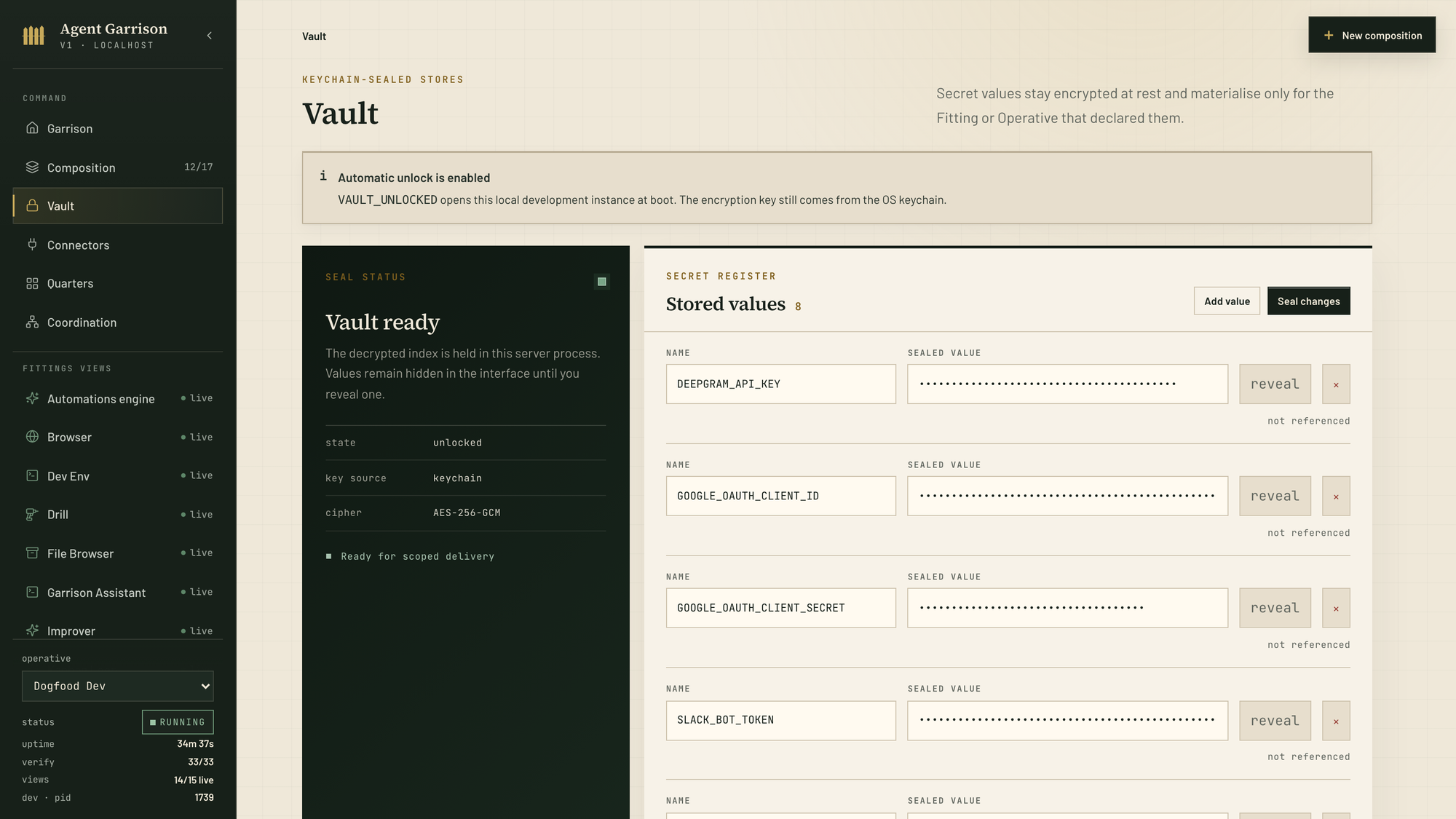
Keys and lines out

The Vault with keychain-sealed secrets

Vault

Keychain-sealed stores: AES-256-GCM at rest, decrypted only into the server process, values hidden until you reveal one. Scoped delivery: a Fitting receives only the secrets it declared.

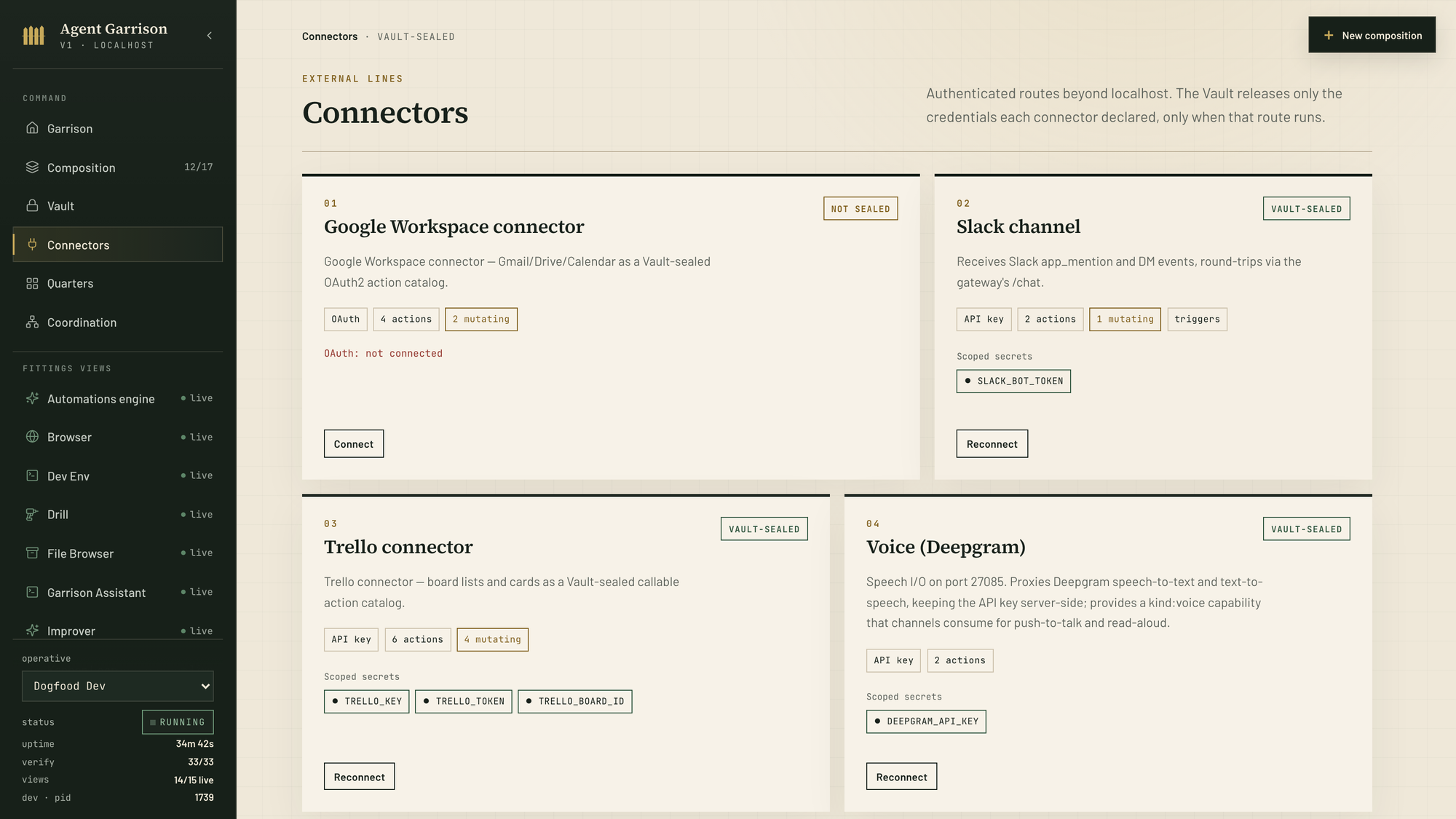
The Connectors page with Vault-sealed services

Connectors

Authenticated lines beyond localhost: Google Workspace, Slack, Trello, Deepgram voice. Each is an action catalog with Vault-sealed credentials released only when that route runs. Honest states, too: one connector is still waiting for its OAuth.

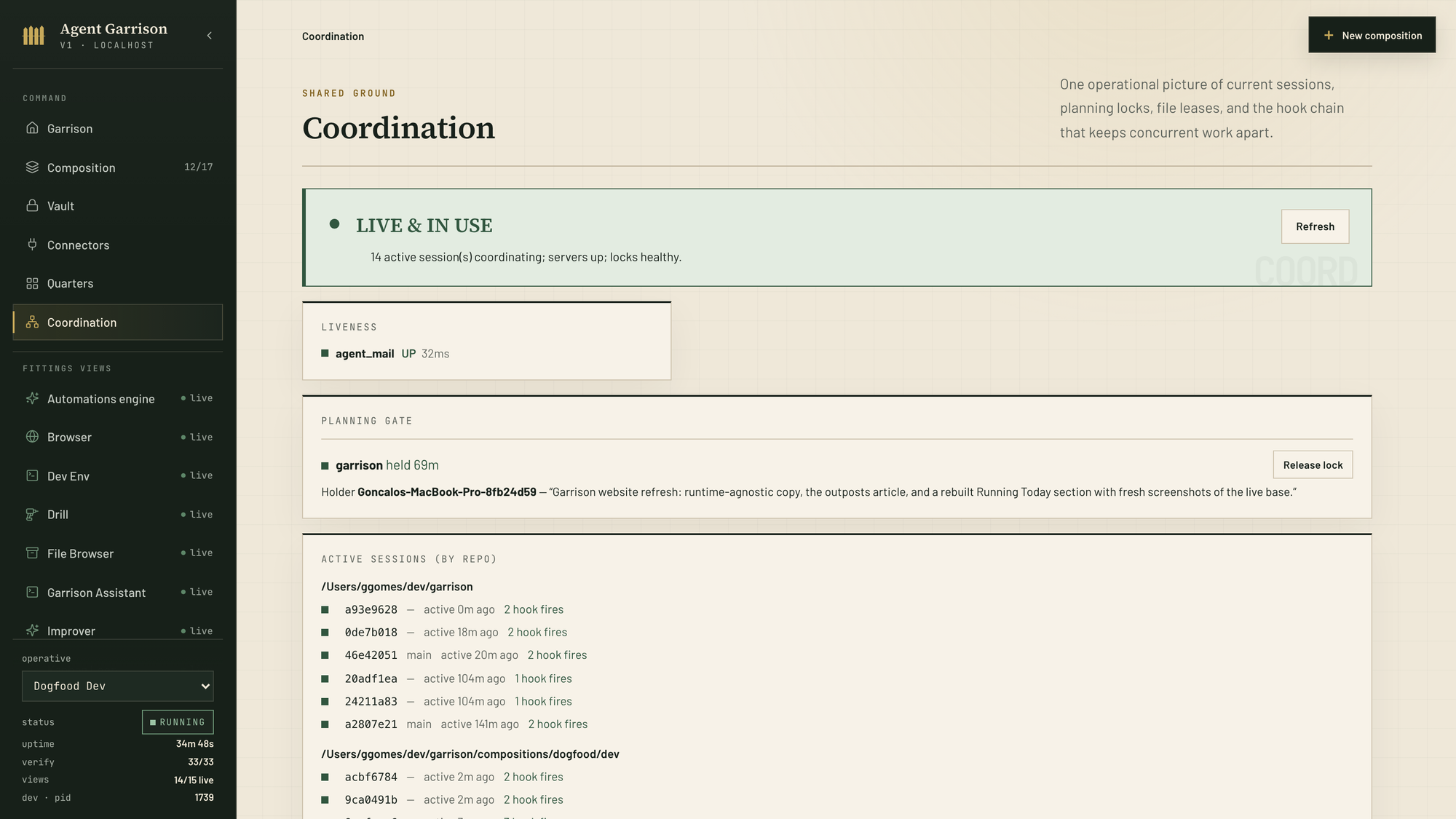
Shared ground

The Coordination page: sessions, planning locks, leases

Coordination

One picture of shared ground: the agent-mail server up, the planning gate holding the repo lock with its summary, and every active session by repo with its hook fires. Release lock works on any lock, even one left behind by a dead session.

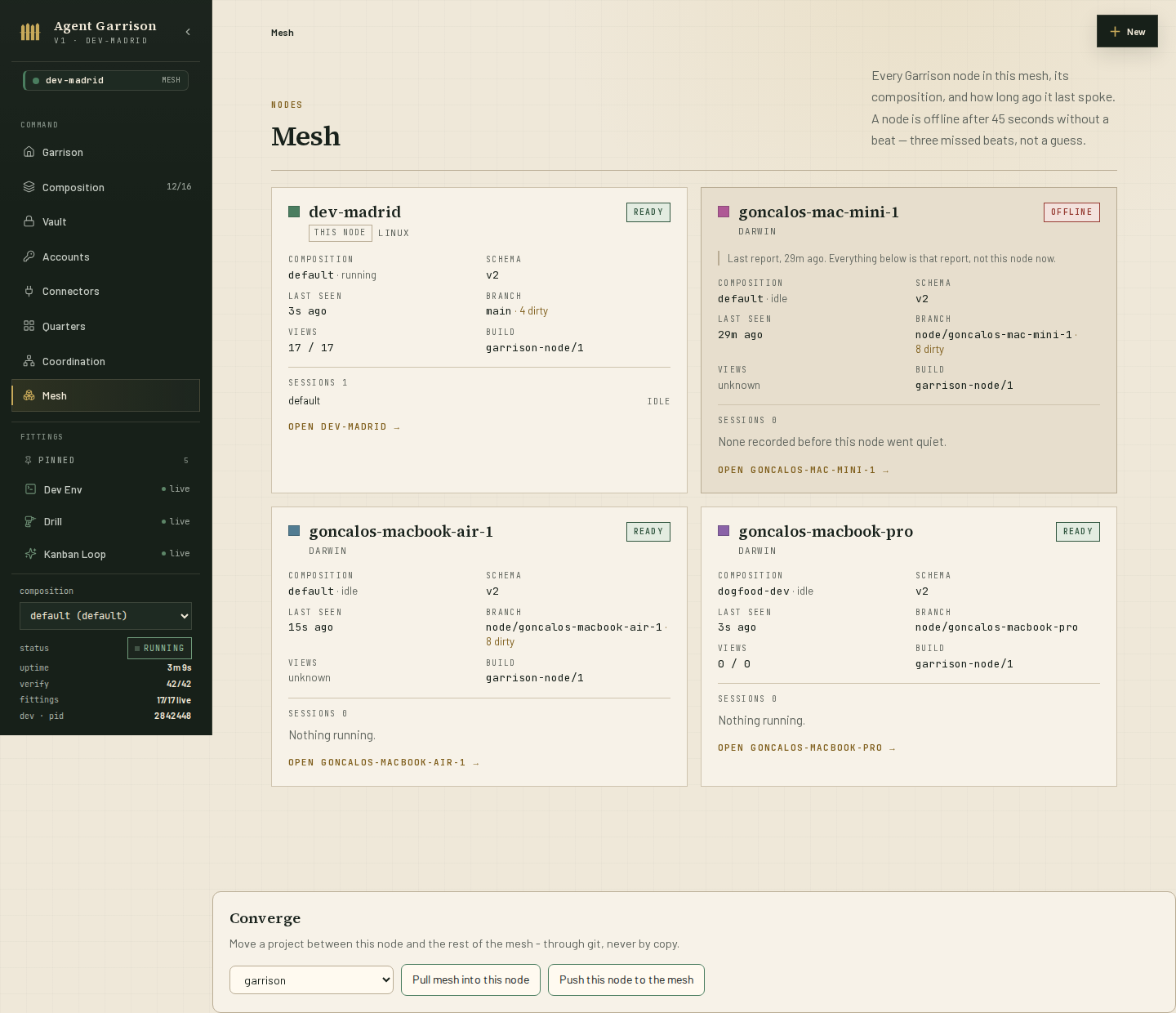
Garrison mesh with a cloud machine enrolled as a node

The mesh

A real second machine, a cloud box named dev-madrid, enrolled as a mesh node over Tailscale: its sessions run there and are watchable from any other node, heartbeat seconds old. One state service and a single git-synced vault keep memory, keys, and coordination one copy across the mesh.

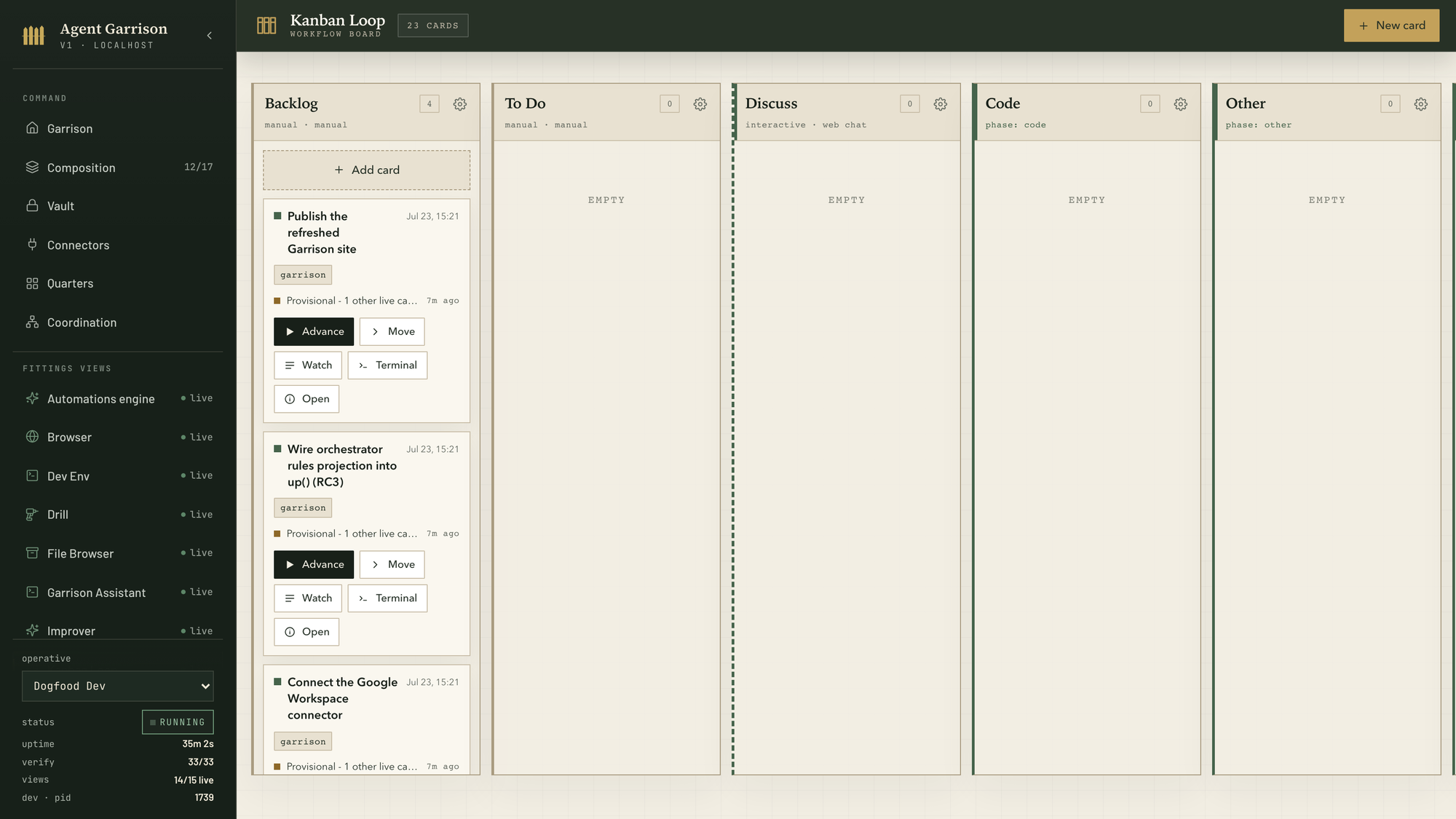
The loop

The Kanban Loop board

Kanban Loop

Every task is a card, and every card is a conversation: dev tasks, personal tasks, manual work, one board. Six state columns - Scheduled, Backlog, To do, Running, Needs input, Done - say where each card stands; the Orchestrator runs every turn as a stretch on the duty it fits, and the card carries Advance, Watch, and a Terminal that drops you into the session doing the work.

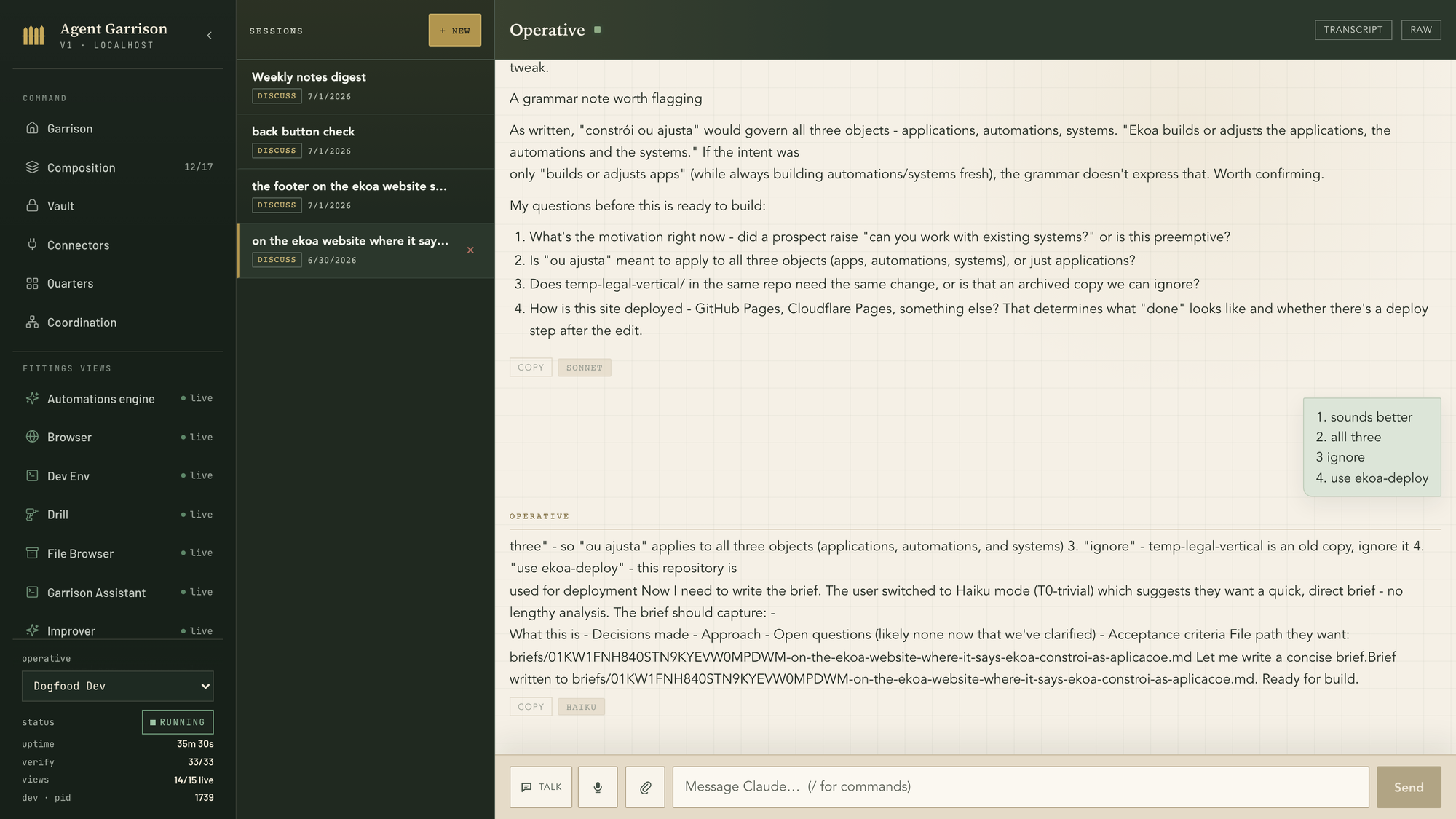
The Web Channel with a discuss conversation

Web Channel

The mobile-first chat over your session. Here the Discuss duty talks a work item through before it goes to planning: four clarifying questions, terse answers, brief written, card ready for build. Model chips on every turn show what it ran on; TALK and the mic drive voice both ways.

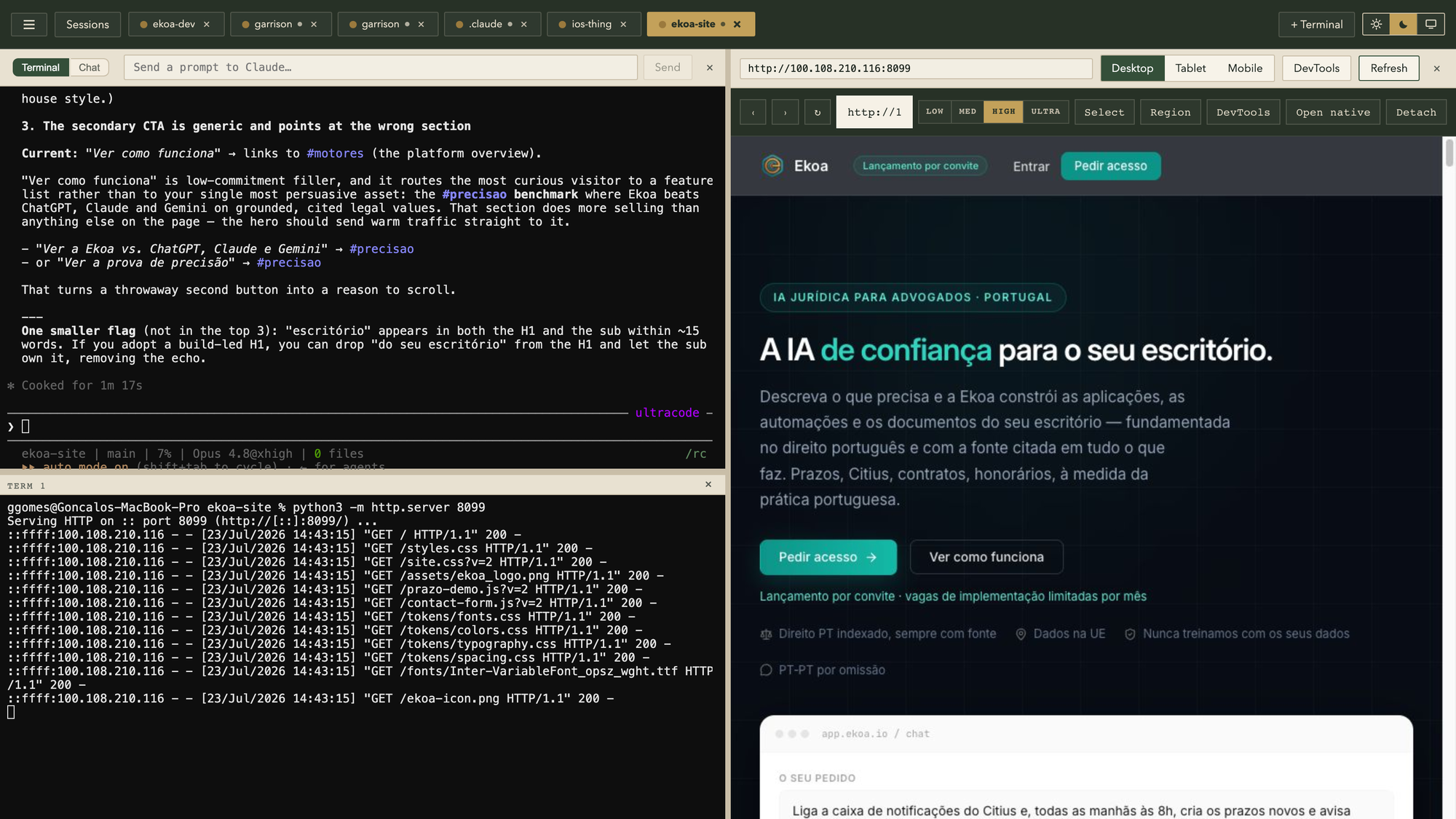
The Dev Env: Claude session, shell, and live browser pane

Dev Env

One session tab, three panes: Claude Code finishing a copy review on the left, a tmux-backed shell serving the site below it, and the live browser rendering the page on the right. Sessions survive restarts; the browser is CDP-driven, so the agent sees exactly what you see.

Drill · visual QA

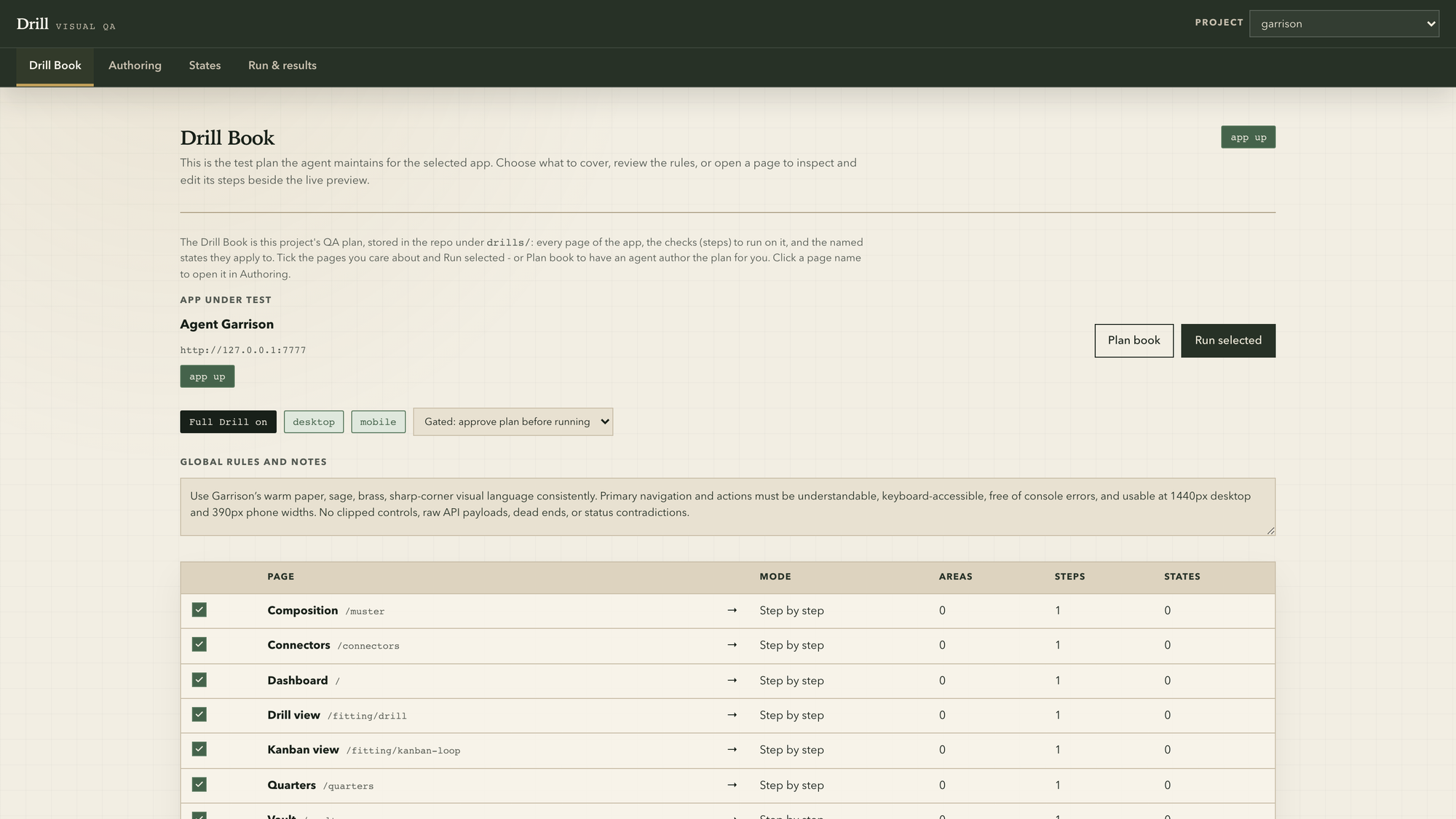
The Drill Book: the QA plan for the app under test

Drill · the book

The QA plan the agent maintains for the app under test, versioned in the repo: pages, checks, states, global rules. The app-up chip is a live probe; if the app is down, Drill starts it through the project's own run skill.

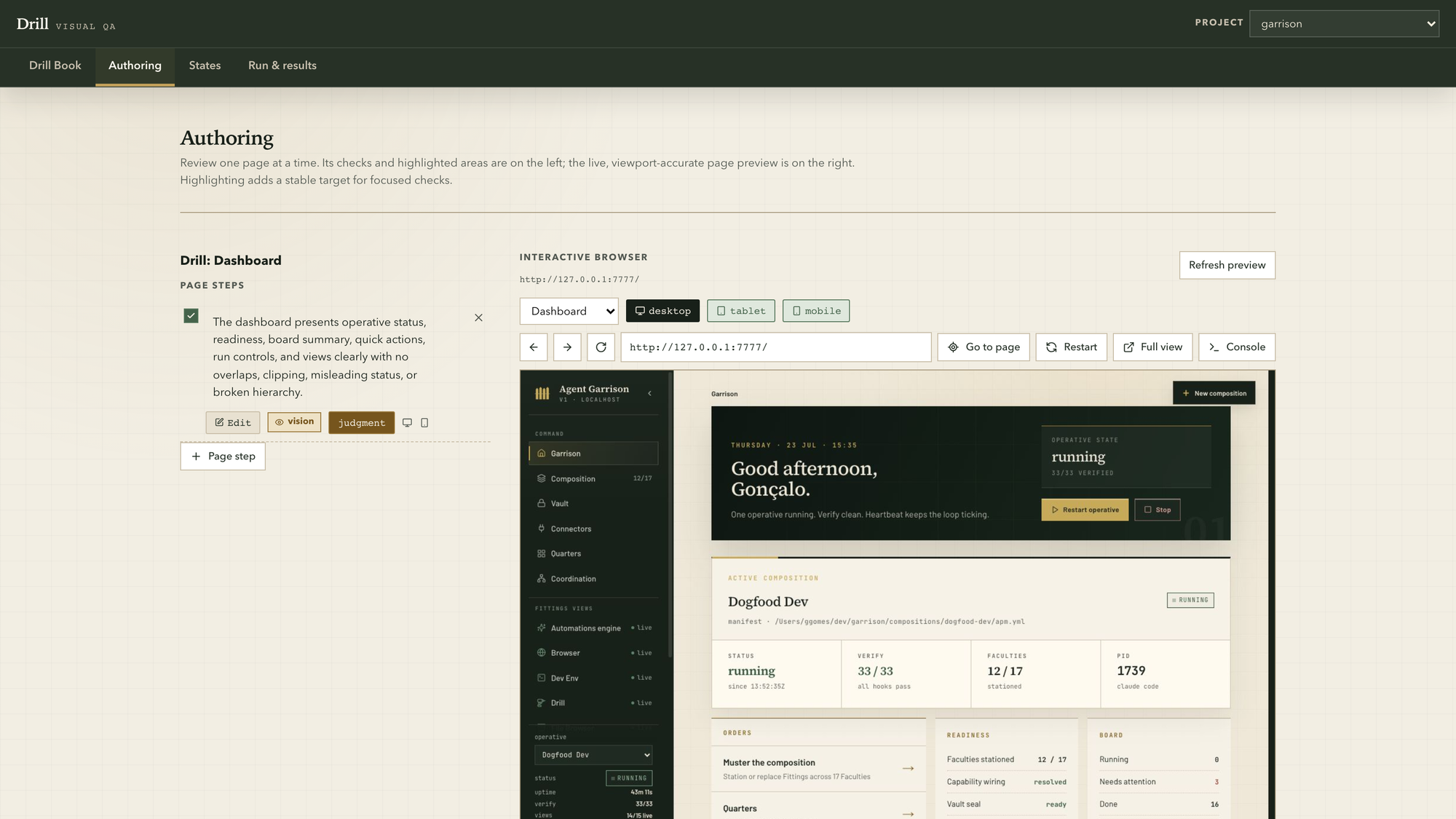
Drill authoring: checks beside a live preview

Drill · authoring

One page at a time: the checks on the left, vision or judgment, per viewport; the live, viewport-accurate preview on the right, with console and full view a click away.

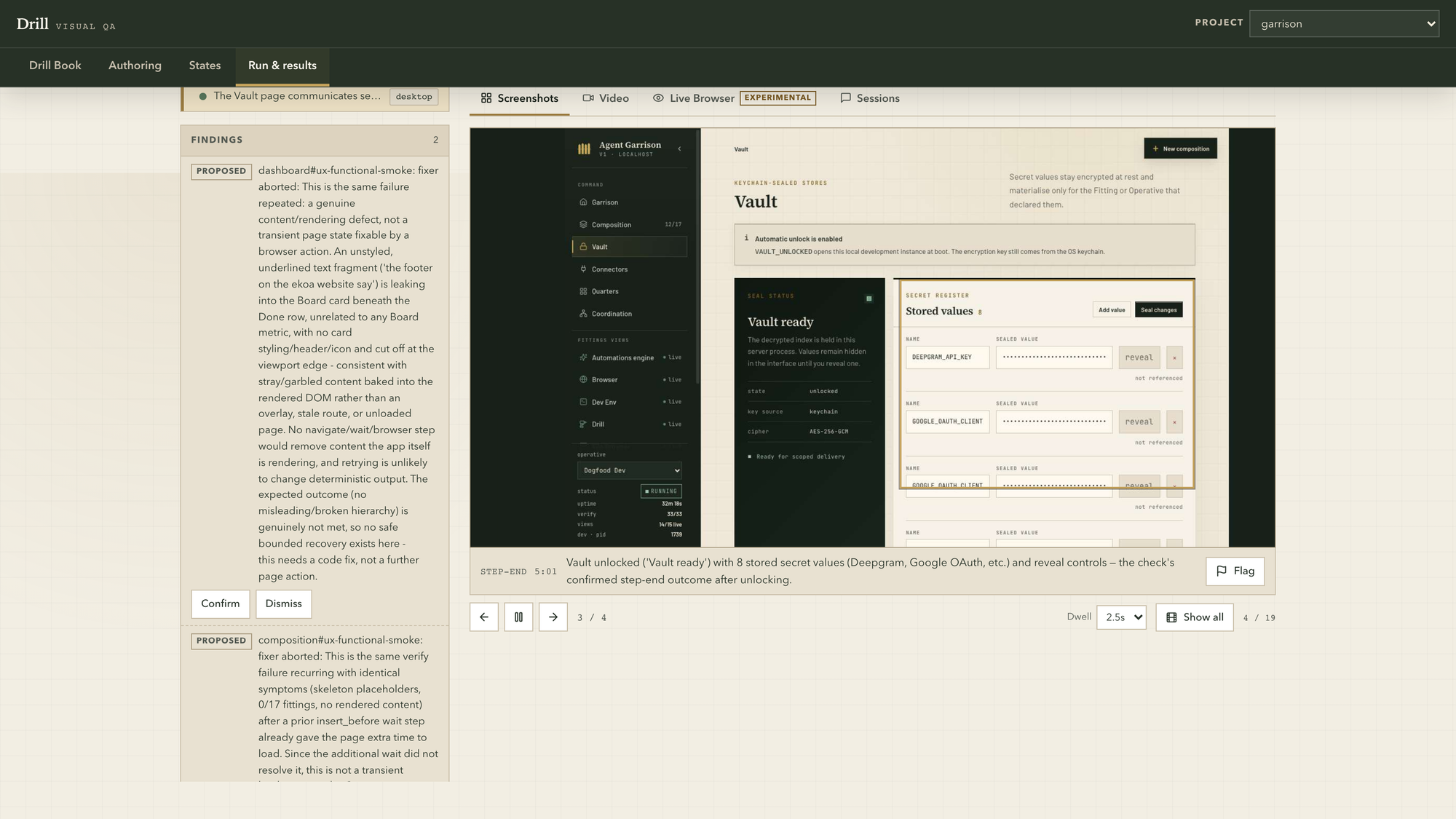
Drill run results: findings beside evidence tabs

Drill · run & results

A finished run with a real catch. Two findings proposed, Confirm or Dismiss, and the evidence four ways: annotated screenshots, video, a live-browser replay, and the agent sessions themselves. The Vault check passed; the dashboard finding became a code fix the same afternoon.

It improves itself

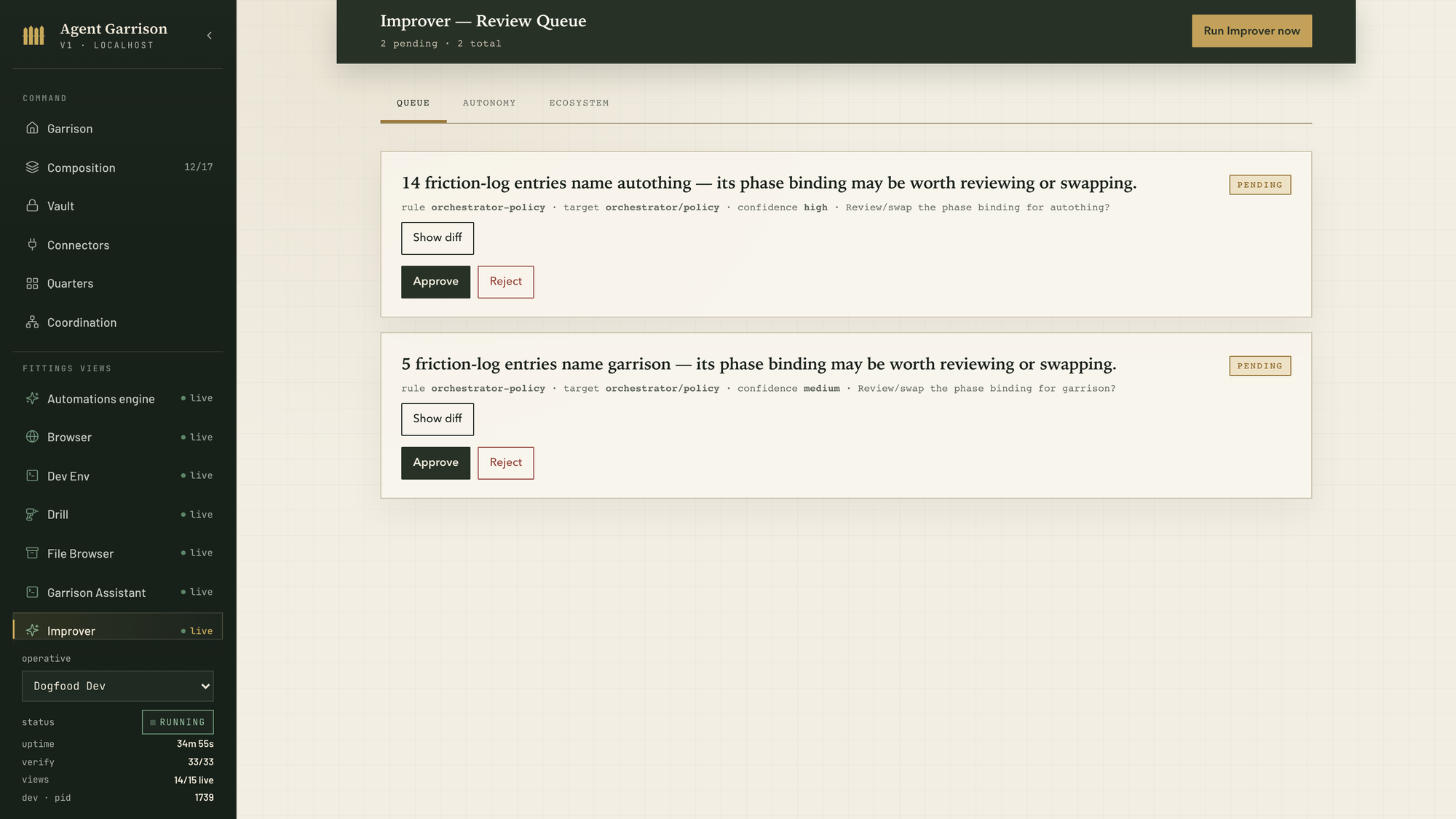
The Improver review queue with pending proposals

Improver

The review queue after a run: proposals mined from real session friction, each with a diff, a confidence, and Approve / Reject. Nothing self-applies unless you, or the autonomy dial, say so.

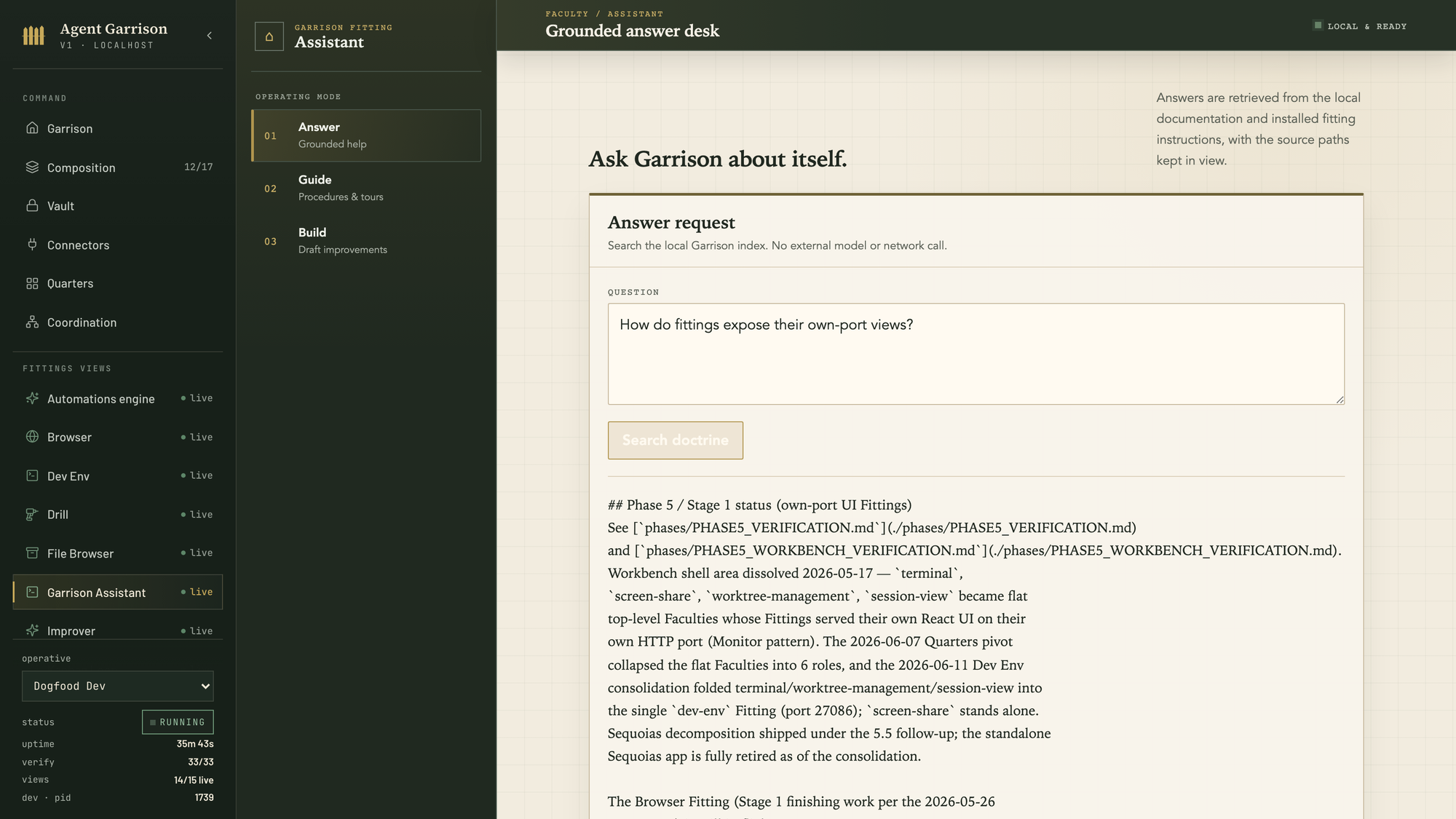
The Garrison Assistant answering from local doctrine

Garrison Assistant

Ask the base about itself. Answers are retrieved from the local documentation and installed Fitting instructions, with source paths kept in view; no external model call.

Presence and protection

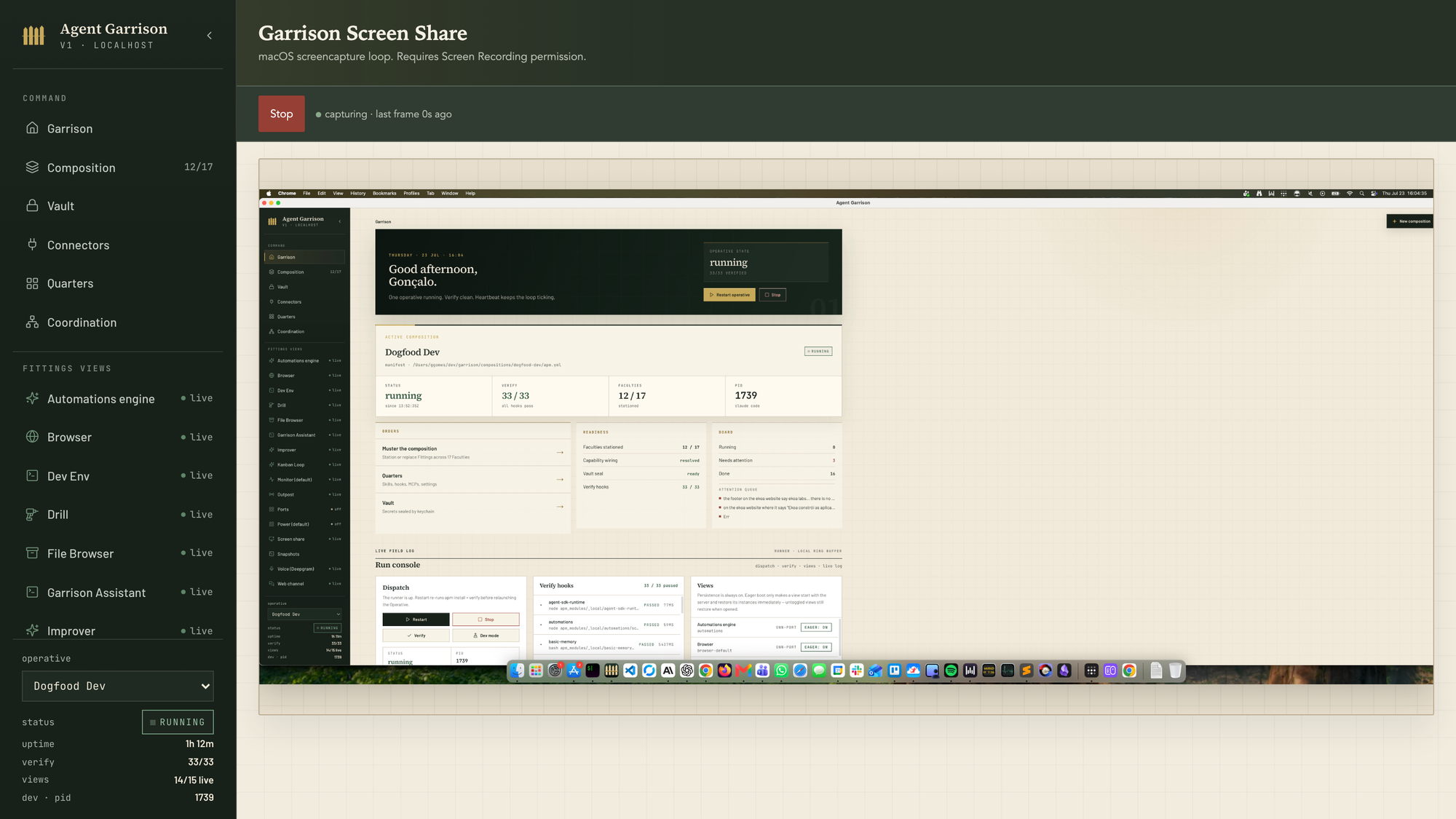
Screen Share streaming the machine's desktop

Screen Share

The machine's actual screen streamed into the base; here it is showing the base itself, fullscreen. Useful from a phone when you want eyes on a long run.

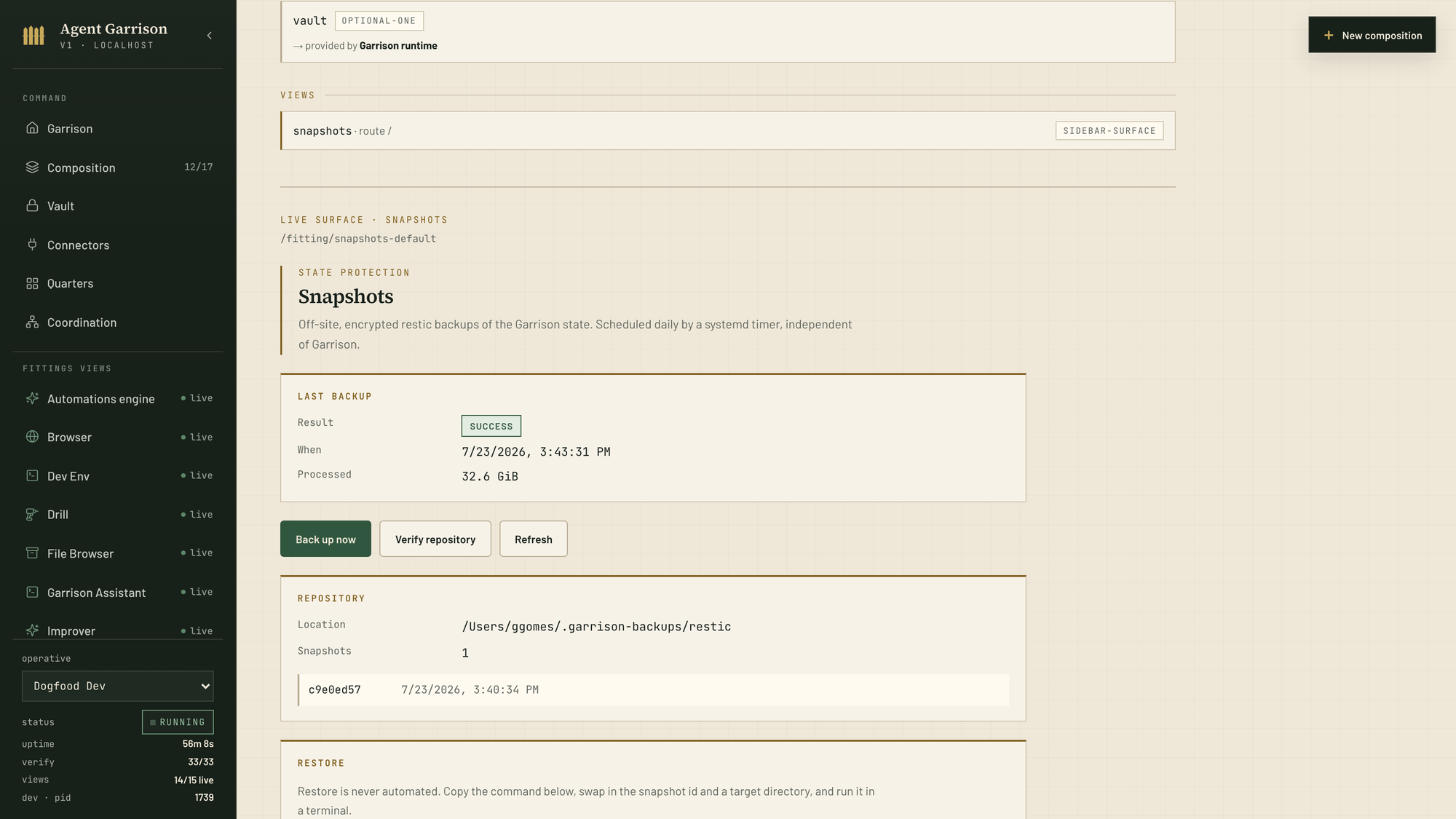
Snapshots: encrypted restic backups of the Garrison state

Snapshots

Encrypted restic backups of the whole Garrison state, ~/.garrison and ~/.claude, on a timer independent of Garrison itself. Restore is deliberately manual: the exact command is printed for you to run.

Also live

live

Orchestrator / Model Router

Classifies each task, then picks runtime, model, effort, and skill by rule: expert, standard, fast.

live

Memory (Obsidian)

An Obsidian vault, graph-linked, shared across machines, runtimes, and agents.

live

Automations engine

Scheduled and triggered jobs, cron-simple.

live

Voice

Local or Deepgram: push-to-talk in, read-aloud out.

live

Browser & File Browser

A CDP-driven browser pane and a namespaced artifact store, both their own views.

live

Monitor

The runtime log of everything the session does, live-tailed.

live

Dev Env

Tabbed sessions per project: a Claude PTY, a tmux shell, and the live browser pane, all surviving restarts.

live

Drill

Visual QA: a Drill Book per app, vision-run checks, findings with evidence.

live

Garrison Assistant

Grounded answers about the base itself, from local docs and Fitting instructions.

live

Improver

Mines sessions for friction and queues proposals with diffs; you approve.

live

Kanban Loop

The board every task lives on; a heartbeat wakes the session to advance it.

live

Mesh

Other machines enrolled as nodes: sessions pinned per node and watchable from any other, one state service, one git-synced vault.

live

Ports

Every listening port on the base, labelled by the Fitting that owns it.

live

Power

An idle watcher: six busy signals decide when the machine may sleep.

live

Screen Share

The machine's screen, streamed; watch a long run from your phone.

live

Snapshots

Encrypted restic backups of the whole state, on an independent timer.

live

Web Channel

The mobile-first chat over your session, voice in both directions.

live

HTTP Gateway

The one door in: every channel reaches the session through it, on a warm PTY pool.

live

MCP Gateway

Exposes the stationed faculties as MCP tools to every interactive session: talk_to, wait_for, and kin.

live

Scheduler

An always-on job daemon, independent of the session: cron ticks and listeners that fire either way.

live

Orchestrator routing inference

Deterministic rules route clear work; one bounded Haiku call resolves ambiguous human requests into a duty and level.

live

Orchestrator Identity (Zeca)

The editable resting identity lives in the Orchestrator: Zeca handles the day and hands real work to the right duty.

live

Garrison Call

Single-shot structured LLM calls through the configured provider adapters.

live

Slack Channel

The same session in Slack: mentions and DMs round-trip through the gateway.

live

Morning Briefing

A scheduled prompt that composes the day's briefing and posts it to your channel.

live

Vault Git Sync

Commits, rebases, and pushes the Obsidian vault between machines; never hard-resets.

live

Taste

The design-taste skill pair: anti-slop frontend taste and an audit-first redesign protocol.

live

Discuss an Automation

A Discuss conversation that designs an automation, writes the brief, and hands it to the planner.